How to Film Multi‑Gimbal Choreography for Stunning Smartphone Music Videos
Introduction
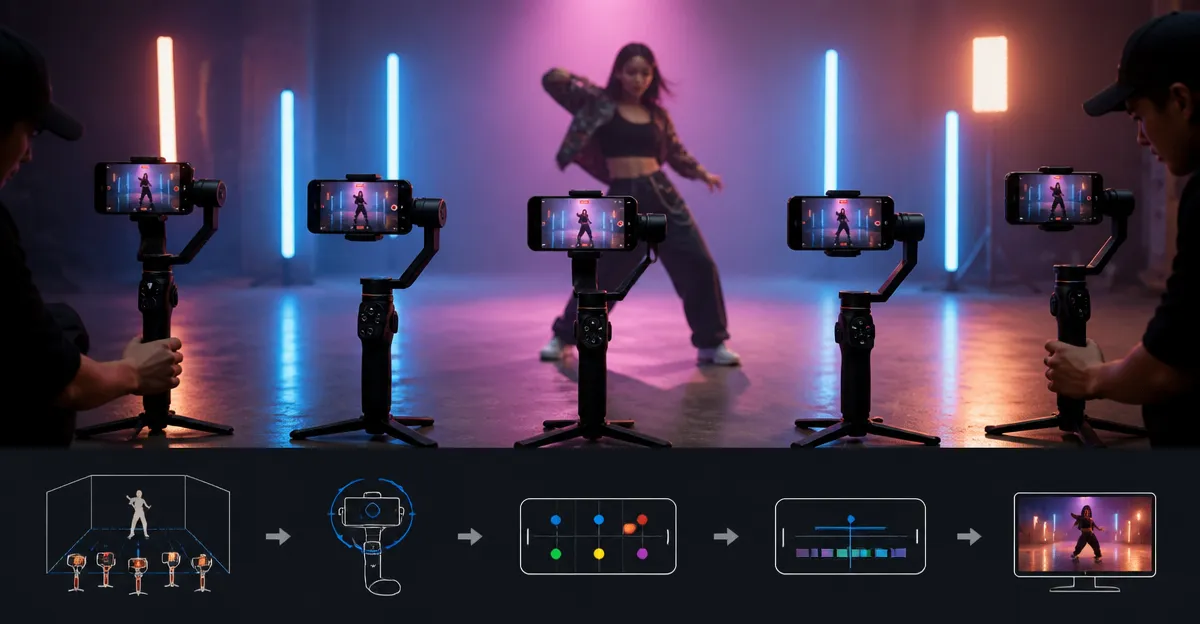
In this guide one will learn how to design, coordinate, and capture multi‑gimbal choreography for a music video using only a smartphone and professional‑grade stabilizers. The process combines creative planning, technical preparation, synchronized movement, and precise post‑production editing. Mastering these steps enables creators to achieve cinematic motion that rivals traditional camera rigs while maintaining the flexibility of a mobile workflow. By the end of the article one will possess a repeatable system for producing high‑impact visual sequences that enhance musical storytelling.
What You’ll Need
- Two or more smartphone gimbals (examples include DJI Osmo Mobile 7, DJI Osmo Mobile 7P, DJI Osmo Mobile 8)
- Smartphones with high‑resolution video capability
- Optional accessories: external microphones, portable LED lights, and tripods
- DJI Mimo app or AOCHUAN app for tracking and editing
- Music track with defined beats per minute (BPM)
- Open space for rehearsals and filming
1. Plan the Choreography and Storyboard
The first step is to translate the musical structure into visual movement. One should listen to the track repeatedly, marking sections such as verses, choruses, and bridges. For each section one can assign a specific gimbal path—circular orbit, linear glide, or dynamic swoop. Sketching a storyboard with frame‑by‑frame annotations clarifies where each gimbal will start, how it will intersect with others, and which camera angles will highlight key performance moments. Including timing notes that correspond to the BPM ensures that the physical motion remains in sync with the audio.
When the storyboard is complete one can identify the number of gimbals required. A typical three‑gimbal arrangement consists of a lead‑gimbal that follows the performer, a secondary gimbal that captures wide establishing shots, and a tertiary gimbal that provides creative overhead or low‑angle perspectives. This modular approach allows flexibility during rehearsal and reduces the risk of collisions.
It is advisable to create a shot list that pairs each storyboard panel with a specific gimbal model. For example, the lead‑gimbal may benefit from the lightweight design of the DJI Osmo Mobile 7, while the secondary gimbal could exploit the built‑in extension rod of the DJI Osmo Mobile 7P for broader framing.
2. Select and Prepare the Gimbals
Choosing the appropriate gimbal for each role is critical. The DJI Osmo Mobile 7 offers a 3‑axis stabilization system, a built‑in tripod, and a battery life of up to ten hours. Its ultra‑light weight of 300 grams makes it ideal for handheld movement and rapid direction changes. Priced at $75.00 with a rating of 4.4/5 from 4,268 reviews, it provides a cost‑effective entry point for creators who require agility.
The DJI Osmo Mobile 7P adds a Multifunctional Module that integrates native tracking, audio reception, and a built‑in lighting element. At $99.00 and a rating of 4.6/5 from 6,903 reviews, it supplies additional creative tools such as the extension rod for wide‑angle selfies and a microphone receiver for high‑quality sound capture. This model excels when a gimbal must serve both visual and audio functions simultaneously.
The premium DJI Osmo Mobile 8 combines AI native tracking, 360° pan rotation, and a built‑in extension rod, all powered by a ten‑hour battery. Priced at $149.00 with a rating of 4.4/5 from 2,980 reviews, it is suited for complex choreography that demands seamless transitions between subjects and angles. Its advanced tracking algorithm ensures that fast‑moving performers remain in focus throughout dynamic sequences.
For creators on a tighter budget the AOCHUAN Smart XE provides a foldable 3‑axis gimbal with a focus wheel and AI Face Track 4.0. At $51.99 and a rating of 4.2/5 from 1,808 reviews, it delivers solid stabilization for lightweight smartphones while remaining highly portable. Its one‑click video button simplifies the switch between horizontal and vertical modes, which is advantageous for TikTok‑style quick cuts.
Before filming, each gimbal should be fully charged, calibrated, and updated with the latest firmware. Balancing the smartphone within the magnetic clamp ensures that the motors operate efficiently and that the battery life remains optimal throughout the shoot.
3. Synchronize Movement and Timing
With the storyboard and equipment prepared, the next phase focuses on rehearsing synchronized motion. One should assign a lead operator who controls the primary gimbal and two assistant operators for the secondary units. Using the music track as a metronome, each operator practices the designated path while maintaining a steady pace that matches the BPM. The DJI Mimo app’s ShotGuides feature can provide visual cues for each movement, allowing operators to internalize timing without constantly glancing at a monitor.
During rehearsal, it is useful to enable ActiveTrack on each gimbal. The DJI Osmo Mobile 7 utilizes dual‑lens enhanced tracking, which improves subject lock when the performer moves laterally. The DJI Osmo Mobile 7P offers native tracking with an integrated microphone, allowing the operator to focus on framing while the device maintains focus on the moving subject.
For complex sequences involving multiple gimbals crossing paths, consider using visual markers on the floor to delineate safe zones. This practice reduces the likelihood of collisions and ensures that each operator remains aware of the spatial relationship between devices.
Once the operators can execute their paths consistently, record a short test clip for each angle. Review the footage to verify that tracking remains smooth, exposure is balanced, and audio (if captured) is free of distortion. Adjust the gimbal settings—such as tracking sensitivity or motor strength—based on the test results.
4. Set Up Lighting and Audio
Effective lighting enhances the visual impact of multi‑gimbal choreography. If the shoot occurs outdoors during daylight, a reflector can soften harsh shadows, while portable LED panels can fill in low‑light areas. The DJI Osmo Mobile 7P includes a built‑in lighting element within its Multifunctional Module, providing a convenient source of fill light that follows the gimbal’s movement.
For indoor environments, position LED lights at a 45‑degree angle to the performer to create depth without causing glare on the smartphone screen. The DJI Osmo Mobile 8 also supports an external lighting accessory that can be mounted on its extension rod, delivering uniform illumination across a wide area.
High‑quality audio is essential for music videos, even when the primary audio track is pre‑recorded. The DJI Osmo Mobile 7P can act as a receiver for DJI Mic Mini TX, allowing the operator to capture ambient sound or spoken commentary without additional hardware. If the budget permits, an external shotgun microphone connected to the smartphone via the USB‑C port will provide clearer vocals during behind‑the‑scenes segments.
All lighting and audio equipment should be tested with the gimbals before the final take to ensure that cables do not interfere with the gimbal’s balance and that the lighting does not cause overexposure.
5. Execute Multi‑Gimbal Takes
When the crew is ready, begin recording simultaneously on each smartphone. The DJI Mimo app offers a one‑tap start feature that can be triggered on each device, but for perfect sync it is advisable to use an external clapboard or a loud hand clap at the beginning of the take. This audio cue creates a visual spike in the waveform that simplifies alignment during post‑production.
During the performance, each operator should maintain smooth, deliberate movements, relying on the gimbal’s stabilization to absorb any unintended shakes. The lead operator using the DJI Osmo Mobile 7 can focus on dynamic close‑ups, while the secondary operator with the DJI Osmo Mobile 8 captures wide‑angle sweeps that showcase the choreography from a distance.
If a shot requires a stationary perspective, fold the gimbal into its built‑in tripod mode and lock the angle before the music begins. This technique is particularly effective for chorus sections where the performer remains in a fixed position while the surrounding environment moves.
After each take, review the footage on the smartphone to confirm that tracking remained consistent and that no frames were dropped due to battery depletion. The ten‑hour battery capacity of all recommended models ensures that multiple takes can be captured without recharging.
6. Post‑Production Alignment and Editing
Import all video files into a non‑linear editing (NLE) program such as Adobe Premiere Pro or DaVinci Resolve. Use the audio spike from the initial clap to synchronize the timelines of each angle. Once aligned, one can alternate between perspectives to emphasize movement, create rhythm, and highlight key musical moments.
The DJI Mimo app’s One‑Tap Edit feature can be employed for quick cuts on the mobile device before transferring the clips to the NLE. This feature automatically applies ShotGuides‑based transitions that match the beat of the music, saving time during the editing process.
Color grading should be consistent across all angles; the gimbals’ built‑in exposure control generally maintains uniform brightness, but minor adjustments may be necessary to balance the footage from the DJI Osmo Mobile 7P (which includes a light) with the darker scenes captured by the DJI Osmo Mobile 7.
Finally, export the video using a high‑bitrate codec to preserve the smoothness achieved by the gimbals. Upload the final product to the desired platform, ensuring that the resolution and aspect ratio match the target audience’s viewing habits.
Tips & Pro Tips
- Maintain a consistent grip on the gimbal handle to avoid accidental input changes during a take.
- Use the built‑in tripod mode for static shots; this eliminates the need for separate tripods and reduces setup time.
- When filming outdoors, enable the gimbal’s wind‑resistant mode if available to counteract gusts that could affect stability.
- Leverage the focus wheel on the AOCHUAN Smart XE to create smooth focus pulls without touching the smartphone screen.
- Record a short B‑roll of the environment; this footage can be layered under the main performance to add depth.
- Regularly calibrate the gimbals, especially after changing smartphones or adding accessories, to maintain optimal motor response.
Troubleshooting
Issue: Tracking loses the subject during rapid movement.
Solution: Increase the tracking sensitivity in the DJI Mimo app and ensure that the smartphone is centered in the magnetic clamp.
Issue: Battery drains faster than expected.
Solution: Disable unnecessary features such as the built‑in light when not required, and close background apps on the smartphone.
Issue: Gimbal feels unbalanced with a heavy case.
Solution: Remove the case or use a slimmer protective cover to keep the center of gravity within the gimbal’s optimal range.
Conclusion
By following the structured workflow presented above, one can successfully film multi‑gimbal choreography that elevates a smartphone music video to a professional standard. The combination of careful planning, appropriate equipment selection, synchronized movement, and meticulous post‑production results in smooth, dynamic visuals that complement the musical narrative. Creators are encouraged to experiment with different gimbal configurations and lighting setups to discover unique visual styles that reflect their artistic vision.
Products Mentioned in This Guide
Frequently Asked Questions
What equipment is required to film multi‑gimbal choreography with a smartphone?
You need two or more smartphone gimbals (e.g., DJI Osmo Mobile 7/7P/8) and a high‑resolution video‑capable phone.
How do I synchronize the movements of multiple gimbals during a shoot?
Plan a choreography, use a visual or audio cue, and start all gimbals simultaneously, optionally using a remote trigger or metronome.
Can I achieve cinematic motion without a traditional camera rig?
Yes, coordinated multi‑gimbal setups provide smooth, dynamic shots that rival conventional rigs while staying portable.
What post‑production steps are essential for polishing multi‑gimbal footage?
Stabilize any residual shake, color‑grade for consistency, and edit clips to match the music’s tempo and beats.
How many gimbals are optimal for a beginner’s music video project?
Starting with two gimbals offers enough variety for dynamic angles without overwhelming the planning process.