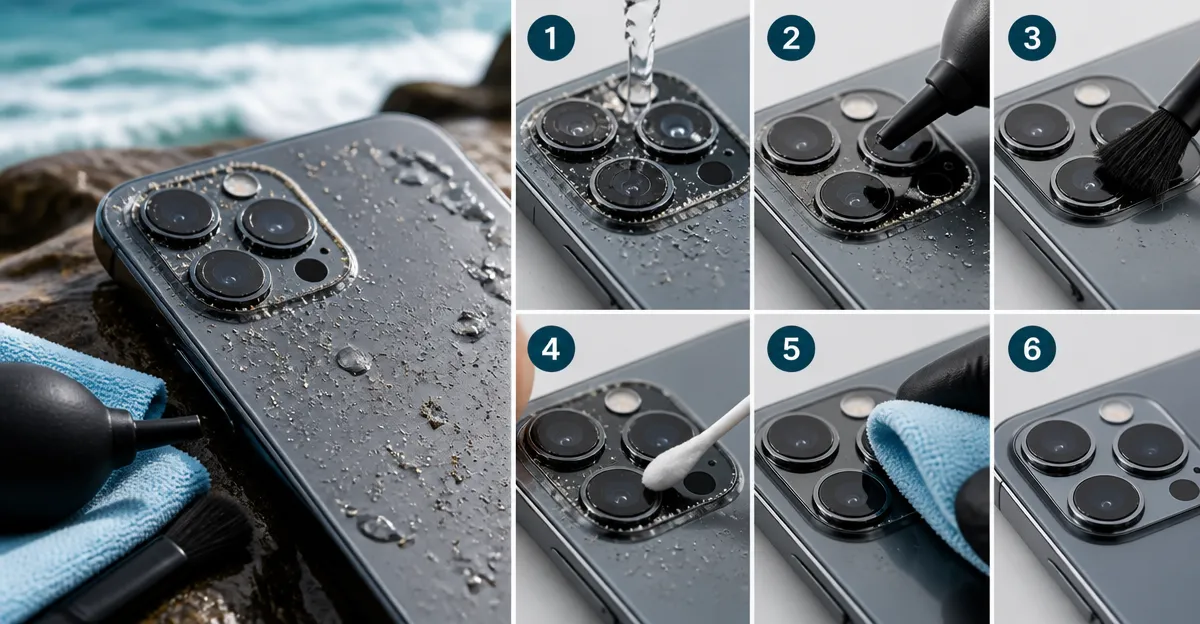
How to Safely Clean Smartphone Camera Lenses After a Saltwater Shoot: Step‑By‑Step Guide to Remove Salt, Sand, and Corrosion
Introduction
Smartphone photographers often underestimate the damage that saltwater, sand, and humidity can inflict on a camera lens. When a lens is exposed to the sea, microscopic salt crystals can settle on the glass, creating streaks, corrosion, and reduced image quality. This guide will teach the reader how to clean a smartphone camera lens safely, why each step matters, and which professional tools can make the process more efficient. By following the instructions, one will preserve optical performance, extend the life of the device, and avoid costly repairs.
The methodology presented works for any modern smartphone, regardless of brand, and can be adapted for other small optics such as action‑camera lenses. The guide balances thoroughness with practicality, ensuring that even a photographer with limited experience can achieve professional results.
What You’ll Need
- Air blower (soft‑silicone nozzle) – e.g., Altura Photo Lens Cleaning Kit (includes a rocket blower)
- Lens cleaning pen with brush and carbon head – available in the same Altura kit or in K&F Concept 4‑in‑1 Lens Cleaning Kit
- Alcohol‑free lens cleaning solution – provided in the Altura and K&F kits
- Microfiber cleaning cloths (multiple sizes) – included in all kits; the oversized cloth from K&F Concept 15‑in‑1 Pro Cleaning Kit is especially useful
- Soft, lint‑free cotton swabs – found in the MBJRFU Camera Lens Cleaning Kit
- Small soft brush (optional) – the brush from any of the kits
- Clean, static‑free workspace and a lint‑free container for discarded debris
Step‑by‑Step Instructions
1. Prepare a Clean Workspace
Begin by selecting a well‑lit, dust‑free surface such as a table covered with a clean, lint‑free cloth. Turn off the smartphone and, if possible, remove any protective case to expose the camera module fully. This preparation prevents accidental scratches and ensures that dust does not settle on the lens while it is wet.
The Altura Photo Lens Cleaning Kit includes a hard‑case that can double as a protective tray for the phone, keeping it stable during the cleaning process.
2. Remove Loose Salt and Sand with an Air Blower
Using a soft‑silicone air blower, gently expel loose salt crystals and sand from the lens surface and surrounding bezel. Hold the blower upright and direct a short burst of air from a safe distance (approximately 2‑3 cm) to avoid pushing particles into the lens.
The blower in the Altura kit is designed to produce a large volume of air without back‑suction, which minimizes the risk of cross‑contamination. Its ergonomic shape allows precise control, making it ideal for delicate smartphone lenses.
Do not use canned compressed air, as the propellant can leave residue that damages anti‑reflective coatings.
3. Dislodge Stubborn Particles with a Lens Cleaning Pen
If any granules remain after blowing, employ the brush end of a lens cleaning pen. Lightly sweep the brush across the lens surface in a circular motion, taking care not to apply excessive pressure.
The pen included in the K&F Concept 4‑in‑1 Lens Cleaning Kit features a soft, lint‑free brush that captures particles without scratching the glass. The carbon‑head side can be used later to absorb fingerprints.
After brushing, repeat the air‑blower step to remove any dislodged debris.
4. Apply Alcohol‑Free Lens Cleaning Solution
Spray a few drops of the alcohol‑free cleaning solution onto a clean microfiber cloth rather than directly onto the lens. This method prevents excess liquid from seeping into the camera housing, where it could reach internal components.
The solution in the Altura kit is formulated without alcohol or ammonia, making it safe for multi‑coated smartphone lenses. It evaporates quickly, reducing the chance of moisture‑related corrosion.
Gently wipe the lens using a straight‑line motion from the center outward, then rotate the cloth and repeat until the surface appears clear.
5. Polish with a Microfiber Cloth
After the cleaning solution has evaporated, use a fresh section of the microfiber cloth to polish the lens. Microfiber fibers are engineered to lift microscopic particles without leaving scratches, delivering a streak‑free finish.
The oversized 40 × 40 cm cloth from the K&F Concept 15‑in‑1 Pro Cleaning Kit provides ample surface area for multiple lenses, allowing you to switch to a clean quadrant as needed.
Inspect the lens under a bright light; any remaining haze indicates that additional polishing may be required.
6. Clean the Sensor Area (If Visible)
Some smartphones expose a small sensor window that can accumulate salt residue. Use a new cotton swab lightly dampened with the same cleaning solution to clean this area. Avoid pressing the swab directly onto the sensor; instead, glide it across the edge of the window.
The MBJRFU kit supplies a set of cotton swabs that are soft enough for sensor work while providing enough firmness to remove stubborn particles.
After cleaning, use a dry portion of the microfiber cloth to remove any residual moisture.
7. Final Inspection and Protective Measures
Examine the lens from multiple angles to confirm that no salt crystals, smudges, or streaks remain. Take a test photograph of a high‑contrast subject (e.g., a newspaper) to verify image clarity.
If the lens appears spotless, reassemble any protective case and power the device back on. Consider applying a thin, anti‑fingerprint coating if the smartphone manufacturer recommends it.
Store the cleaning tools in the hard case supplied by the Altura kit to keep them organized and ready for future shoots.
Tips & Pro Tips
- Work in a low‑humidity environment. Moisture accelerates corrosion; a dry room reduces risk.
- Never use household glass cleaners. They contain ammonia or alcohol that can damage coatings.
- Use a fresh microfiber quadrant for each wipe. Re‑using a dirty area re‑introduces particles.
- Rinse the blower occasionally. Salt can accumulate inside the nozzle; a quick rinse with distilled water keeps airflow clean.
- Schedule regular maintenance. After each saltwater shoot, clean the lens promptly to prevent long‑term corrosion.
Troubleshooting
| Problem | Possible Cause | Solution |
|---|---|---|
| Persistent haze after cleaning | Residue from cleaning solution or incomplete removal of salt crystals | Repeat step 4 with a fresh microfiber cloth; ensure the solution is alcohol‑free. |
| Scratches on the lens surface | Use of abrasive material or excessive pressure | Switch to a new microfiber cloth; apply only light pressure. |
| Corrosion around the lens mount | Salt infiltration into the housing | Use a soft brush (from any kit) to gently clean the mount, then dry thoroughly with a lint‑free cloth. |
Conclusion
Cleaning a smartphone camera lens after exposure to saltwater requires a systematic approach that removes debris, dissolves salt, and protects delicate coatings. By following the seven steps outlined above, photographers can restore image clarity, prevent corrosion, and extend the lifespan of their devices. The recommended tools—air blower, lens cleaning pen, alcohol‑free solution, and high‑quality microfiber cloths—provide reliable results while minimizing the risk of damage. Consistent maintenance after each marine shoot will keep the lens performing at its best.
Products Mentioned in This Guide
Frequently Asked Questions
Why must I clean my smartphone camera lens after a saltwater shoot?
Salt crystals and moisture cause streaks, corrosion, and reduced image quality, which can permanently damage the lens if left untreated.
What is the safest first step to remove salt and sand from the lens?
Use a soft‑silicone air blower to gently blow away loose particles before any liquid cleaning.
Which cleaning solution is recommended for smartphone lenses?
A 50/50 mix of distilled water and isopropyl alcohol applied with a microfiber cloth safely dissolves salt without harming lens coatings.
How often should I clean my lens if I frequently shoot near the ocean?
Inspect and clean the lens after each saltwater session, and perform a deeper cleaning weekly to prevent buildup.
Can regular household wipes be used on the camera lens?
No; household wipes can contain abrasives or chemicals that scratch coatings—stick to microfiber cloths and approved lens cleaners.