
Introduction
This guide explores the essential elements of lighting for smartphone hyperlapse production. Readers will learn how light quality influences motion perception, how to select appropriate equipment, and how to implement step‑by‑step techniques that produce cinematic results. The article balances theoretical concepts with practical recommendations, ensuring that both novices and experienced creators gain actionable insight. By the end of the guide, one will possess a clear workflow for achieving consistent, professional‑grade illumination in any environment.
Background/Context
Hyperlapse is a time‑lapse technique that incorporates camera movement, creating dynamic sequences that capture long periods within a short clip. Because the camera moves, shadows and highlights shift dramatically, making uniform lighting a critical factor. Smartphone sensors have limited dynamic range compared to dedicated cinema cameras, therefore external illumination often determines the final image quality. Understanding color temperature, intensity, and diffusion is therefore foundational before selecting any hardware.
Key Lighting Concepts for Hyperlapse
Three core concepts govern successful hyperlapse lighting: color temperature consistency, controllable brightness, and soft diffusion. Color temperature, measured in kelvins, should remain stable throughout the recording to avoid flickering; a range of 3000K to 6500K covers warm to daylight tones. Brightness control allows the creator to adapt to ambient changes, while diffusion softens harsh shadows that become exaggerated during motion. Mastery of these concepts enables one to maintain visual continuity across dozens of frames.
Choosing a Primary Light Source
For most creators, a compact ring light provides even, shadow‑free illumination that wraps around the subject. The Yarrashop Desk Ring Light offers a 10.5‑inch LED array with 120 LEDs, delivering a bright yet soft output suitable for indoor hyperlapse shoots. Its dimmable function spans three color temperatures (3000K‑6500K) and ten brightness levels, allowing precise adaptation to varying ambient light. The adjustable height from 23 to 31 inches ensures optimal positioning relative to a smartphone on a tripod, while the 180‑degree swivel head facilitates angle correction without disturbing the scene.
Key specifications of the Yarrashop Desk Ring Light include a colour rendering index (CRI) above 95, guaranteeing accurate colour reproduction, and a USB power option that integrates easily with portable power banks. With a price of $32.86 and a rating of 4.3 out of 5 from 2,495 reviews, it represents a cost‑effective solution for creators seeking consistent lighting without excessive bulk.
Supplementary Lighting for Depth and Dimension
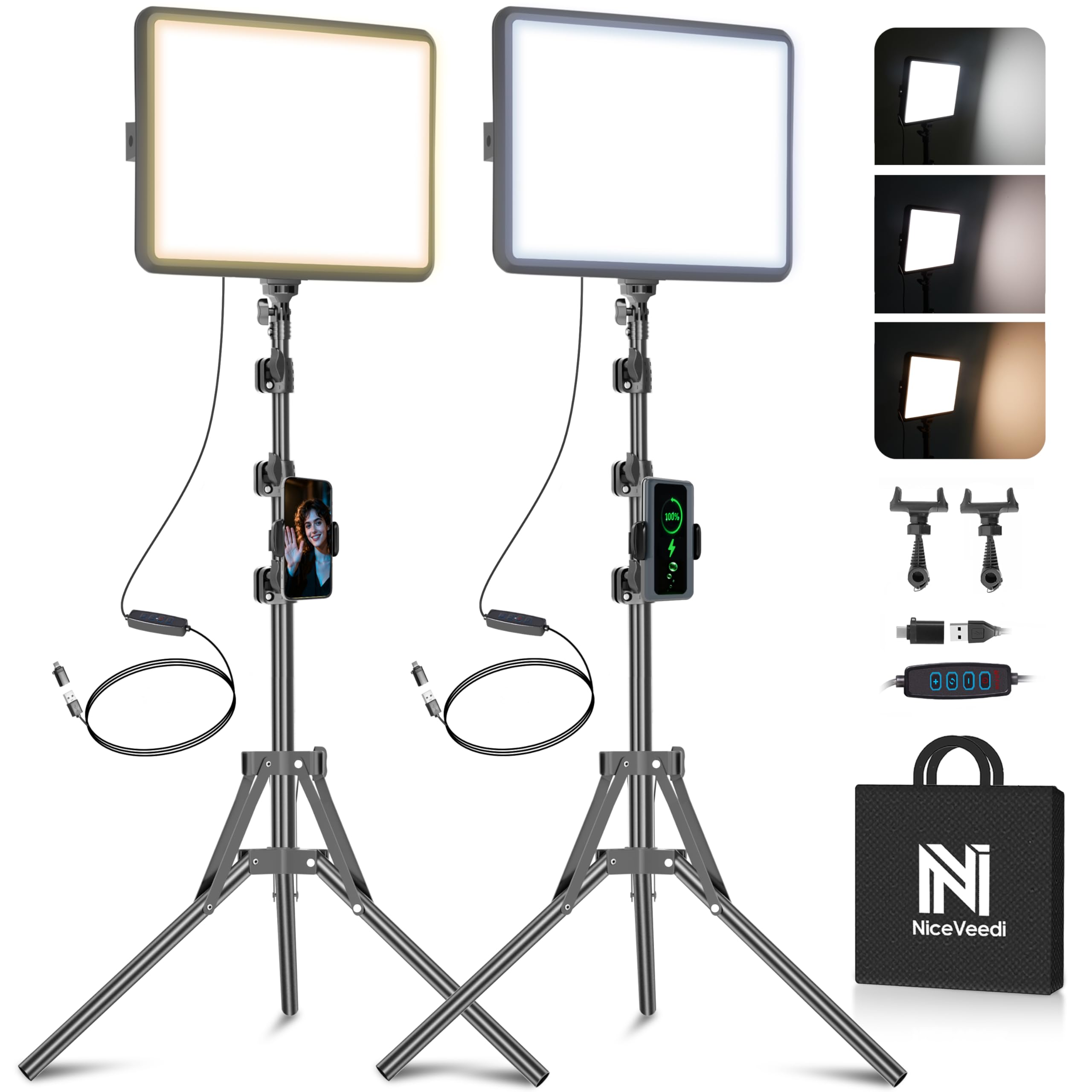
While a ring light supplies frontal illumination, adding a secondary light source creates depth and separates the subject from the background. The NiceVeedi LED Video Light Kit includes two 10‑inch panels, each offering 356 LEDs and a high CRI of 97+. The kit provides three selectable colour temperatures (2800K, 4800K, 6500K) and remote‑controlled brightness ranging from 10% to 100%, making it ideal for fine‑tuning side or back lighting.
Each panel mounts on an adjustable aluminium tripod that extends to 60 inches, allowing creators to position lights at varying heights and angles. The inclusion of USB‑C adapters enables power from a laptop, power bank, or wall charger, ensuring flexibility on location shoots. Priced at $49.99 with a 4.3 rating from 6,087 reviews, the kit delivers professional‑grade illumination for a modest investment.
Comparison/Selection Guide
| Feature | Yarrashop Desk Ring Light | NiceVeedi LED Video Light Kit |
|---|---|---|
| LED Count | 120 | 356 per panel |
| Colour Temperature | 3000K‑6500K (3 presets) | 2800K, 4800K, 6500K |
| Brightness Levels | 10 | 10‑100% via remote |
| CRI | >95 | >97 |
| Power Source | USB‑C | USB‑C / USB‑A |
| Price | $32.86 | $49.99 |
| Ideal Use | Front‑facing, selfie‑style hyperlapse | Side or back lighting, multi‑light setups |
Creators who require a single, space‑saving light should prioritize the Yarrashop Desk Ring Light. Those who need flexible side lighting and a higher LED count will benefit from the NiceVeedi LED Video Light Kit. Both products maintain a high CRI, ensuring colour accuracy across the hyperlapse sequence.
Step‑by‑Step Lighting Setup for Smartphone Hyperlapse
- Mount the smartphone on a stable tripod or gimbal to prevent jitter during movement.
- Position the primary ring light directly in front of the subject at a 45‑degree angle to reduce flat lighting.
- Set the colour temperature to match ambient daylight; for indoor shoots, 3000K provides a warm tone, while 5600K mimics natural light.
- Adjust brightness to achieve a mid‑gray exposure on the smartphone’s histogram, avoiding overexposure in highlights.
- If depth is required, place one panel from the NiceVeedi kit on the opposite side, angled 30 degrees upward to create subtle rim lighting.
- Use the remote to fine‑tune the secondary panel’s intensity, ensuring the subject remains evenly lit throughout the motion path.
- Enable the smartphone’s lock‑exposure feature, if available, to maintain consistent exposure across all frames.
- Begin recording the hyperlapse, moving the camera smoothly along the planned trajectory while monitoring the lighting for any flicker.
Following these steps guarantees that each frame receives uniform illumination, reducing post‑production colour correction workload. Consistency in lighting also preserves the visual rhythm that makes hyperlapse compelling.
Best Practices & Tips
- Prefer continuous LED lighting over incandescent bulbs, as LEDs produce no flicker at typical smartphone frame rates.
- Utilize diffusion material, such as a thin white cloth or a softbox, to soften harsh shadows when shooting outdoors in bright sunlight.
- Check battery levels of both lighting units before extended shoots; a depleted light can cause sudden exposure shifts.
- When shooting in changing daylight, consider using a neutral density filter on the smartphone lens to maintain exposure while adjusting light intensity.
- Record a short test clip and review it on a calibrated monitor to verify colour consistency before committing to the full sequence.
Frequently Asked Questions
Can I use the ring light without a power outlet?
Yes, the Yarrashop Desk Ring Light operates via USB‑C, allowing connection to a power bank for portable use.
Do I need a separate phone holder for the ring light?
The ring light includes a 360° bendable metal hose that securely holds most smartphones, eliminating the need for an additional holder.
How do I prevent colour temperature shifts when moving the camera?
Set the light temperature to a fixed value and avoid mixing daylight with artificial light sources; consistent temperature eliminates flicker.
Is the NiceVeedi kit compatible with iPhone and Android devices?
The kit provides a universal USB‑C power connection and a standard 1/4" mount, making it compatible with any smartphone tripod adapter.
What is the advantage of a high CRI rating?
A CRI above 95 ensures that colours are rendered accurately, which is essential for hyperlapse sequences where colour shifts become noticeable.
Conclusion
Effective hyperlapse lighting hinges on consistency, controllability, and colour accuracy. By understanding core lighting principles and selecting equipment such as the Yarrashop Desk Ring Light and the NiceVeedi LED Video Light Kit, creators can produce professional‑grade smartphone videos with minimal post‑production effort. The step‑by‑step workflow and best‑practice tips outlined in this guide empower one to achieve reliable results in a variety of shooting environments.
Products Featured in This Guide

Yarrashop Desk Ring Light
Price: $32.86 | Rating: 4.3/5 (2,495 reviews)
Featured for its adjustable colour temperature, high CRI, and integrated smartphone holder, making it an ideal primary light for hyperlapse shooting.

NiceVeedi LED Video Light Kit
Price: $49.99 | Rating: 4.3/5 (6,087 reviews)
Featured for its dual‑panel design, high CRI of 97+, and remote‑controlled brightness, providing versatile supplemental lighting for depth and dimension in hyperlapse projects.