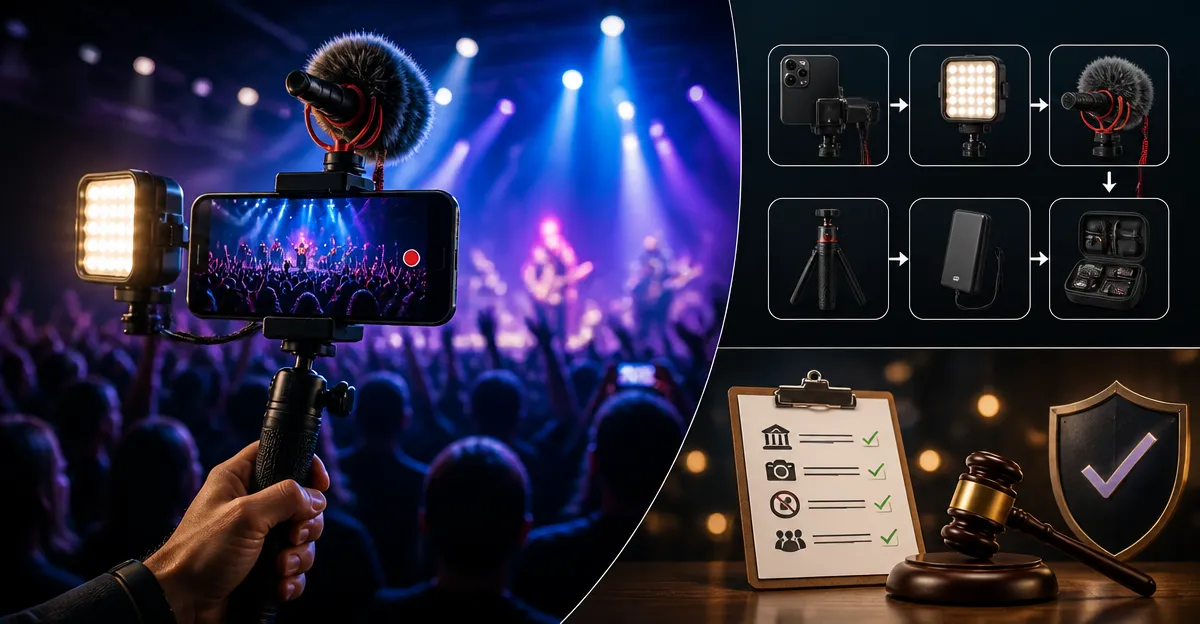
How to Build the Ultimate Concert Vlogging Rig: Smartphone Lighting, Gear Setup & Legal Tips
Introduction
Creating high‑quality concert vlogs with a smartphone requires more than simply pointing and recording. One must consider stability, lighting, audio capture, and the legal environment of live venues. This guide will teach the reader how to assemble a reliable rig, illuminate performers, manage sound, and avoid common legal pitfalls. By following each step, the reader will be able to produce professional‑looking footage without investing in an expensive camera system.
The instructions are written for an intermediate audience who already owns a modern smartphone and wishes to elevate their content. All recommended tools are available on Amazon, and each recommendation includes price, rating, and a brief justification. The guide remains valuable even if the reader chooses alternative products, because the underlying principles are explained in detail.
Before beginning, it is advisable to review the venue’s policy on recording equipment and to obtain any required permissions. Failure to do so can result in ejection from the venue or legal action.
What You'll Need
- SmallRig Universal Smartphone Video Rig – $59.99, 4.6/5 rating
- Doormoon Adjustable Phone Lanyard – $7.99, 4.5/5 rating
- JSAUX Foldable Aluminum Phone Stand – $8.99, 4.8/5 rating
- Bostionye 11‑in‑1 Universal Phone Lens Kit – $34.10, 3.8/5 rating
- PopSockets Knurled Adhesive Grip – $6.49, 4.5/5 rating
- Portable LED panel (e.g., a small battery‑powered panel)
- External microphone compatible with smartphone (e.g., a shotgun mic with 3.5 mm jack)
- Mini tripod or clamp for stage lighting
Step‑by‑Step Instructions
1. Secure Your Smartphone with a Stable Mount
The first priority is to prevent camera shake caused by hand tremors or crowd movement. The SmallRig Universal Smartphone Video Rig provides a rugged aluminum cage that fits most flagship phones, including the iPhone 17 series and Samsung Galaxy S24. Weighing only 120 g, the rig includes dual silicone‑covered handles that improve grip during dynamic shots. Its multiple expansion ports allow attachment of a microphone, LED light, or tripod, making it a versatile foundation for the entire setup.
To install, slide the phone into the cage, secure the built‑in clamps, and tighten the Allen wrench until the device is firmly seated. The cage’s shoe mount on top will later accept the LED panel or a small tripod for lighting.
Why choose this rig over a simple hand‑hold? The cage distributes weight evenly, reduces fatigue, and provides mounting points that a bare phone lacks. This stability translates directly into smoother footage, especially in low‑light concert environments where longer exposure times are common.
2. Add a Secondary Grip for Safety
Even with a sturdy cage, a sudden push from a crowd can cause the phone to slip. The Doormoon Adjustable Phone Lanyard attaches to the side of the rig and loops around the neck or wrist, providing an extra safety line.
Thread the lanyard through the side handle of the SmallRig cage, adjust the length so that the device hangs comfortably at chest level, and secure the clasp. The nylon material is tear‑proof and waterproof, ensuring durability during sweaty concert nights.
Using a lanyard prevents accidental drops and frees the vlogger’s hands for operating the camera controls. It also serves as a convenient place to hang a small bottle of water or a set of spare batteries.
3. Optimize Lighting with Portable LEDs
Concert venues often feature dramatic stage lighting, but the ambient light may not illuminate the vlogger’s face or surrounding crowd. A compact LED panel mounted on the rig’s shoe mount supplies supplemental front light.
Choose a battery‑powered LED panel that offers adjustable color temperature (3200 K–5600 K). Clip the panel onto the top of the SmallRig cage, power it on, and set the brightness to a level that balances with the stage lights without causing flare.
Proper lighting reduces noise in the video and preserves detail in the performer’s facial expressions. It also helps the smartphone’s autofocus system maintain focus on moving subjects.
4. Enhance Audio Capture
Smartphone microphones struggle to pick up clear audio in noisy venues. Attach a directional shotgun microphone to the rig’s side handle using the provided 3.5 mm jack. If the phone lacks a headphone jack, use a USB‑C to 3.5 mm adapter.
Position the microphone a few inches above the phone, pointing toward the stage. Test the audio levels before the show begins, and adjust the gain to avoid clipping.
Clear audio is essential for audience engagement; viewers often abandon videos with poor sound, even if the visuals are impressive.
5. Expand Creative Options with Lens Attachments
The Bostionye 11‑in‑1 Universal Phone Lens Kit adds optical versatility. The kit includes a 20× telephoto lens for close‑up shots of performers, a 0.63× ultra‑wide lens for capturing the entire stage, and a 15× macro lens for detail work such as instrument strings.
To install, remove the phone case (the kit works best without it), align the desired lens with the phone’s camera, and screw it securely. The included clip and mini‑tripod allow you to mount the lens‑enhanced phone on a stable surface when you need a static shot.
Using these lenses prevents the need to crop footage later, preserving resolution and ensuring a cinematic feel.
6. Use a Compact Stand for Static Shots
When the vlogger wishes to record a stationary segment—such as an interview with a band member—the JSAUX Foldable Aluminum Phone Stand offers a lightweight, adjustable platform.
Unfold the stand, set the angle between 0° and 90°, and place the rig on top. The stand’s sturdy swivel joint ensures the phone remains secure even on uneven surfaces.
This setup frees the vlogger’s hands for gesturing, enables smoother pans, and reduces fatigue during long interviews.
7. Add a PopGrip for One‑Handed Operation
During high‑energy songs, the vlogger may need to move quickly while keeping the phone steady. The PopSockets Knurled Adhesive Grip adheres to the back of the phone, providing a comfortable thumb hold and a pop‑out kickstand.
Press the grip onto the phone’s rear surface, ensuring the area is clean and free of silicone cases. The knurled texture prevents slipping, and the grip can be collapsed when not needed.
Having a PopGrip enables one‑handed framing adjustments without sacrificing stability, which is especially useful in cramped standing‑room areas.
8. Legal and Venue Considerations
Before recording, verify the venue’s policy on personal recording equipment. Some venues require a written permit, while others prohibit any filming beyond personal use. Contact the venue’s management team at least one week in advance.
Respect the performers’ rights by avoiding close‑up shots of copyrighted visuals such as projected lyrics or brand logos. If you plan to monetize the footage, obtain a release form from the artist or their management.
Be mindful of local privacy laws. In many jurisdictions, recording individuals without consent is permissible in public spaces, but concerts may be considered private events. When in doubt, ask for permission from nearby audience members before focusing on them.
Tips & Pro Tips
- Carry spare batteries for the LED panel and your smartphone; low power can cause the phone to throttle performance.
- Use a small microfiber cloth to keep the lens surfaces clean; dust can cause flare under stage lights.
- Set your smartphone’s video mode to the highest bitrate available to preserve detail in fast‑moving scenes.
- When using the telephoto lens, keep a steady hand or mount the rig on a mini‑tripod to avoid motion blur.
- Test the audio mix by recording a short segment of the opening act; adjust microphone placement if the crowd noise overwhelms the music.
- Consider using a windscreen on the external mic if the venue is outdoors.
Troubleshooting
Problem: The phone’s camera loses focus during fast movements.
Solution: Switch to manual focus mode if your phone supports it, or use the wide‑angle lens from the Bostionye kit to increase depth of field.
Problem: The LED panel creates a noticeable hotspot on the performer’s face.
Solution: Diffuse the light with a small white fabric or adjust the panel’s angle to a 45° offset, allowing softer illumination.
Problem: The PopGrip does not adhere properly.
Solution: Clean the phone’s rear surface with an alcohol wipe, and press the grip firmly for at least 30 seconds. If the phone case is textured, remove it before applying.
Conclusion
By integrating a stable cage, secondary safety lanyard, supplemental lighting, professional audio, and versatile lenses, the vlogger can capture concert footage that rivals dedicated camcorders. Following the legal guidelines ensures that the content can be shared without infringing on venue or artist rights. With practice, the rig becomes an extension of the creator’s storytelling toolkit, enabling immersive, high‑quality concert vlogs.
Products Mentioned in This Guide
Frequently Asked Questions
What basic equipment do I need to build a stable concert vlogging rig for a smartphone?
A sturdy phone mount, a lightweight tripod or monopod, and a handheld stabilizer or gimbal are essential for smooth footage.
How can I improve lighting on stage when using only a smartphone?
Attach a compact LED panel or ring light to your rig and position it to supplement stage lighting without causing glare.
What’s the best way to capture clear audio in a loud concert environment?
Use an external shotgun mic or a wireless lapel mic connected via the phone’s audio jack or adapter to isolate the performer’s sound.
Do I need permission to record video and audio at a live concert?
Yes, always check the venue’s recording policy and obtain written consent from the venue or artist to avoid ejection or legal issues.
Are there affordable alternatives to the recommended Amazon gear that still work well?
Any reputable phone mount, budget LED light, and compatible external mic that meet the same specifications will work; the key is stability, brightness, and audio quality.